


How Businesses Can Use Miro to Build More Effective Collaborative Workflows
Modern businesses are no longer limited to traditional office meetings, physical whiteboards, and long email conversations. Teams today work from different cities, countries, and sometimes completely different time zones. Because of this change, companies need smarter ways to share ideas, organize projects, and keep everyone connected. This is where Miro becomes a powerful solution. Miro is a visual collaboration workspace that helps teams brainstorm, plan projects, create workflows, and solve problems together in one digital space.
Table of Contents
- 1 Understanding Miro and Its Role in Modern Business Collaboration
- 2 Why Traditional Workflows Often Fail in Modern Companies
- 3 How Miro Helps Businesses Create Better Collaborative Workflows
- 4 How Miro Improves Decision-Making in Businesses
- 5 Using Miro for Agile Team Collaboration
- 6 How Miro Supports Innovation and Creative Thinking
- 7 Key Ways Businesses Can Use Miro for Workflow Improvement
- 8 Using Miro Templates to Save Time and Improve Productivity
- 9 Miro for Business Process Improvement
- 10 How Different Teams Can Benefit from Miro
- 11 Integrating Miro With Other Business Tools
- 12 Benefits for Remote and Hybrid Teams
- 13 Best Practices for Building Effective Workflows in Miro
- 14 Common Mistakes Businesses Should Avoid When Using Miro
- 15 Future of Collaborative Workflows With Miro and AI
- 16 Conclusion
- 17 Frequently Asked Questions
Understanding Miro and Its Role in Modern Business Collaboration
Miro is an online visual collaboration platform that works like a digital whiteboard. However, it offers much more than a simple drawing space. Businesses can create boards where teams can add ideas, diagrams, documents, timelines, notes, workflows, and project information. The platform supports both real-time collaboration and asynchronous work, allowing employees to contribute whether they are online together or working at different times.
Think of Miro as a large meeting room that exists online. Instead of people gathering around a physical board, everyone can open the same digital workspace and contribute from anywhere. A designer can add a prototype idea, a developer can suggest technical improvements, and a manager can review progress without needing everyone to be physically present.
The biggest advantage of Miro is that it converts complex information into visual formats. Humans often understand pictures, diagrams, and connected ideas faster than long written documents. A workflow diagram, for example, can show the complete journey of a process, including tasks, decisions, and responsibilities. This makes it easier for teams to identify problems and improve operations.
Why Traditional Workflows Often Fail in Modern Companies
Many businesses still depend on old methods of collaboration. Employees exchange hundreds of emails, update multiple spreadsheets, and attend frequent meetings just to understand project status. These methods can create confusion because important information may become outdated or difficult to find.
A common problem is the lack of visibility. When different departments work separately, teams may not know what others are doing. Marketing may create plans without understanding product limitations, while development teams may build features without knowing customer expectations.
Another challenge is communication delay. If a team member in another country has an idea, they may need to wait several hours or days before receiving feedback. This slows decision-making and reduces innovation.
Miro solves these challenges by creating a shared environment where information remains visible and accessible. Everyone can see project progress, add feedback, and understand the bigger picture. Instead of working in separate spaces, teams work together around the same visual information.
How Miro Helps Businesses Create Better Collaborative Workflows
Visual Planning and Idea Organization
One of the strongest features of Miro is visual planning. Businesses can use boards to organize ideas, create strategies, and design workflows in a simple way. Instead of writing a long document explaining a process, teams can create diagrams that show every step clearly.
For example, a company launching a new product can create a Miro board containing market research, customer feedback, product requirements, design ideas, development tasks, and launch plans. Every department can contribute information in one place.
Visual planning also improves brainstorming sessions. During traditional meetings, only a few people usually share their opinions while others remain silent. Miro allows everyone to add sticky notes, comments, and suggestions, creating a more inclusive environment.
Businesses can use features such as mind maps, flowcharts, timelines, and Kanban boards to structure their thinking. These tools help teams move from random ideas to organized action plans.
Real-Time and Asynchronous Team Collaboration
Modern companies need collaboration methods that work for both office-based and remote teams. Miro supports real-time collaboration where multiple team members can work on the same board at the same time. It also supports asynchronous collaboration, where employees can contribute ideas whenever they have time.
This adaptability is particularly helpful for international teams. A marketing manager in India can add campaign ideas, a designer in Europe can review visuals later, and a manager in the United States can provide feedback after checking updates.
Asynchronous collaboration also reduces unnecessary meetings. Instead of scheduling a meeting only to discuss updates, employees can review the board, leave comments, and make decisions directly.
This creates a healthier workflow because employees spend more time focusing on meaningful work rather than attending repeated status meetings.
How Miro Improves Decision-Making in Businesses
Making the right decision at the right time is important for every business. However, many teams struggle with decision-making because information is spread across different platforms, meetings, and documents. Miro helps solve this problem by creating a visual space where teams can collect ideas, analyze information, discuss options, and make decisions together.
With Miro boards, businesses can compare different solutions, create strategy maps, and document important discussions. Instead of depending only on verbal communication, teams can see all available information in one place. This reduces misunderstandings and helps leaders make decisions based on clear data and team feedback.
Using Miro for Agile Team Collaboration
Agile working methods focus on flexibility, continuous improvement, and strong communication between teams. Many software development and product teams use Agile approaches such as Scrum and Kanban to manage their projects.
Miro supports Agile workflows by providing digital boards for sprint planning, backlog management, daily discussions, and retrospective meetings. Teams can create task boards where activities move through different stages such as:
- Backlog
- In Progress
- Testing
- Completed
During sprint planning meetings, team members can discuss priorities and assign tasks directly on the Miro board. This creates a clear understanding of project goals and responsibilities.
How Miro Supports Innovation and Creative Thinking
Innovation is important for businesses that want to stay competitive. However, generating new ideas requires an environment where employees feel comfortable sharing their thoughts.
Miro creates a creative workspace where teams can freely exchange ideas through brainstorming sessions, mind maps, diagrams, and visual frameworks. Employees can contribute ideas without worrying about traditional meeting limitations.
For example, during a product innovation workshop, employees can add customer problems, possible solutions, and new concepts using digital sticky notes. The team can then organize similar ideas, discuss their importance, and select the best opportunities.
Key Ways Businesses Can Use Miro for Workflow Improvement
Project Management and Task Planning
Project management requires clear communication, task assignment, and progress tracking. Miro helps businesses create visual project plans where teams can understand goals and responsibilities.
A project manager can create a roadmap showing important milestones, deadlines, and team members responsible for each activity. Teams can also create task boards similar to Kanban systems where tasks move through different stages such as planning, development, testing, and completion.
For example, a software company can use Miro to manage a mobile application project. The board may include customer requirements, user stories, design concepts, development tasks, testing activities, and release plans.
Product Development and Design Thinking
Product development involves many stages, including research, planning, designing, testing, and improvement. Miro supports this entire process by helping teams collaborate from the beginning to the final product launch.
Product teams can use Miro for:
- Brainstorming new product ideas
- Creating customer journey maps
- Developing product roadmaps
- Collecting user feedback
- Planning design workshops
Design thinking depends heavily on understanding customer problems and finding creative solutions. Miro provides a visual space where teams can collect user information, analyze problems, and develop solutions together.
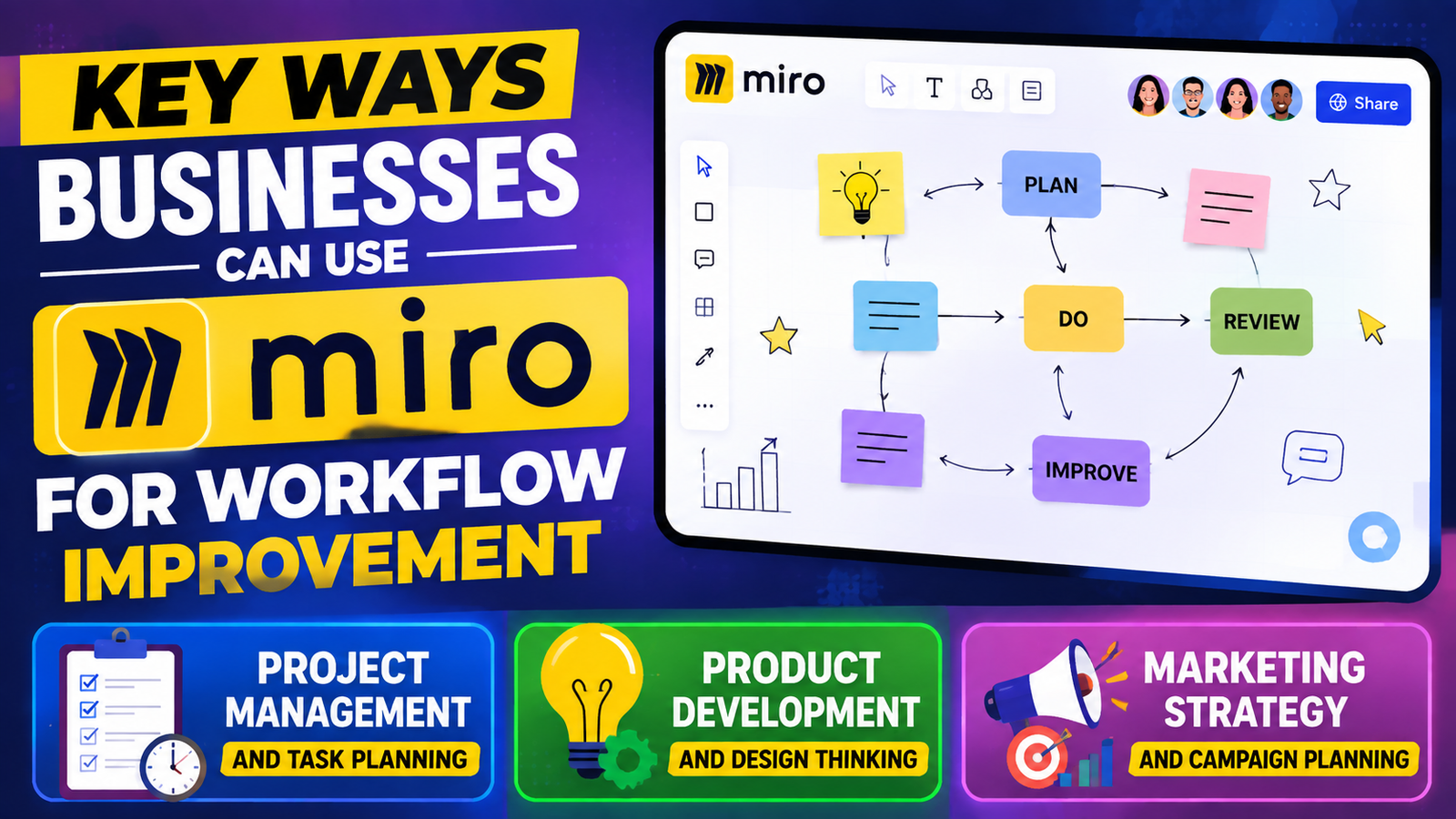
Marketing Strategy and Campaign Planning
Marketing teams can also use Miro to create better workflows. A successful marketing campaign requires coordination between content writers, designers, social media managers, advertising teams, and business leaders.
A Miro marketing board can include campaign goals, customer personas, content calendars, advertising ideas, and performance tracking plans.
For example, before launching a new product, the marketing team can create a campaign roadmap showing:
- Target audience
- Marketing channels
- Content schedule
- Team responsibilities
- Campaign deadlines
This visual approach helps teams avoid confusion and ensures every member understands the campaign direction.
Using Miro Templates to Save Time and Improve Productivity
One reason businesses prefer Miro is its wide range of templates. Instead of creating every workflow from the beginning, teams can start with ready-made structures and customize them according to their needs. Miro provides templates for workflows, planning, brainstorming, project management, and business processes.
Templates reduce setup time and help teams follow proven methods. A new team member can understand a project faster because information is arranged in a structured format.
Workflow Maps and Process Diagrams
Workflow diagrams are useful for understanding how tasks move through a business process. Companies can use Miro to map approval processes, customer support systems, hiring procedures, and operational activities.
For example, a company improving its customer service process can create a workflow showing:
Customer complaint → Support review → Solution development → Customer response → Feedback collection
By visualizing the process, businesses can identify unnecessary steps and improve efficiency.
Customer Journey Mapping
Understanding customers is essential for business success. Customer journey maps help companies understand how customers interact with their products and services.
Using Miro, teams can map different customer stages, including:
- Awareness
- Research
- Purchase
- Usage
- Support experience
This helps companies identify customer problems and create better experiences.
Miro for Business Process Improvement
Every business has processes that can be improved. These may include employee onboarding, customer support, sales operations, or internal communication systems.
Miro helps companies analyze existing processes and identify areas where improvements are needed. Teams can create process maps that show each step of a workflow and identify delays, unnecessary tasks, or communication gaps.
For example, a company reviewing its employee onboarding process can create a Miro workflow showing:
Job Offer → Document Collection → Training → Team Introduction → Performance Review
By visualizing the complete process, managers can identify slow steps and create a smoother employee experience.
Process improvement through Miro helps organizations save time, reduce errors, and create more consistent operations.
Instacart – Shoppers Guide to Earning More With Flexible Delivery Work
Top Benefits of Using ZipRecruiter for Recruitment and Job Search
Is Cede Worth It? A Detailed Guide to Features and Advantages
Swanwick Business Growth Guide: Proven Marketing Strategies for 2026
PureVPN Affiliate Program Commission Structure Explained
How Different Teams Can Benefit from Miro
Different departments can use Miro according to their specific requirements.
Human Resource teams can use Miro for recruitment planning, employee onboarding workflows, and training programs.
IT teams can create system diagrams, software planning boards, and development workflows.
Business teams can use Miro for strategy planning, decision-making, and organizational improvement.
Education and training teams can use Miro for interactive learning activities and workshops.
Because Miro is flexible, it can support almost any team that requires collaboration and visual planning.
Integrating Miro With Other Business Tools
Miro becomes even more useful when connected with existing business applications. Companies can integrate Miro with project management, communication, and productivity tools to create smoother workflows. Miro supports many integrations that help teams connect their existing systems.
For example:
- Developers can connect project information with development tools.
- Teams can combine communication platforms with Miro updates.
- Businesses can connect documents and project resources.
These integrations reduce the need to switch between multiple applications and keep important information connected.
Benefits for Remote and Hybrid Teams
Remote work has changed how businesses operate. Teams need digital platforms that support communication and teamwork without depending on physical locations.
Miro helps remote teams feel connected because everyone works inside the same visual environment. Employees can share ideas, review updates, and participate in discussions without being in the same office.
This improves transparency because project information is available to everyone who needs it. It also creates stronger teamwork because employees feel more involved in decision-making.

Best Practices for Building Effective Workflows in Miro
Businesses should follow some simple practices to get maximum value from Miro:
First, keep boards organized. Too much information can make a board confusing. Use clear sections, labels, and categories.
Second, focus on action. A Miro board should not become just a collection of ideas. Teams should define tasks, owners, and deadlines.
Third, regularly update boards. An outdated board can create the same problems as outdated documents.
Finally, encourage team participation. Miro works best when everyone contributes instead of only viewing information.
Common Mistakes Businesses Should Avoid When Using Miro
Some businesses create large boards without proper structure. This can make information difficult to understand.
Another mistake is using Miro only for brainstorming and ignoring its workflow capabilities. The platform can support complete project processes, not just idea generation.
Companies should also avoid creating too many separate boards. Having a clear organization system makes information easier to manage.
Future of Collaborative Workflows With Miro and AI
The future of business collaboration will become more connected with artificial intelligence. Miro is expanding its AI capabilities to help teams create workflows, organize information, and improve decision-making.
AI-powered collaboration can help businesses summarize discussions, organize ideas, generate diagrams, and automate repetitive tasks.
As companies continue adopting remote and hybrid work models, platforms like Miro will become important for maintaining teamwork and innovation.
Conclusion
Miro helps businesses create more effective collaborative workflows by combining visual planning, teamwork, and process management in one digital workspace. It allows companies to move away from disconnected communication methods and create a more transparent way of working.
Whether a company needs better project management, improved product development, stronger marketing planning, or smoother remote collaboration, Miro provides tools that support modern business needs.
The key benefit of Miro is not just the platform itself but the way it changes how teams think and work together. When ideas, tasks, and decisions are visible to everyone, businesses can make faster decisions, reduce confusion, and build stronger workflows.
Frequently Asked Questions
Q. What is Miro mainly used for in businesses?
Miro is mainly used for visual collaboration, brainstorming, workflow planning, project management, and team communication. Businesses use it to organize ideas and improve teamwork.
Q. Can remote teams use Miro effectively?
Yes, Miro is designed for remote and hybrid teams. Employees can collaborate in real time or contribute asynchronously from different locations.
Q. Is Miro useful for small businesses?
Yes, small businesses can use Miro for planning projects, managing tasks, creating strategies, and improving team communication.
Q. Can Miro replace project management tools?
Miro can support many project management activities, but companies often use it together with dedicated project management tools for better results.
Q. How does Miro improve business productivity?
Miro improves productivity by reducing communication gaps, organizing information visually, improving teamwork, and helping employees make faster decisions.
Recent Post
Understanding Managed Hosting Features and Tools Offered by WP Engine

A Practical Guide to Making the Most of gymdolphin for Fitness

Discovering Contemporary Men’s Clothing Styles at Incerunmen

Why Online Shoppers Are Exploring UOOZEE for New Products

How Weblium.com Helps Simplify the Website Creation Process

Understanding Supplement Selection and Quality at BulkSupplements.com

How Digital Solutions Are Evolving With CHENGDU OUMEI NETWORK INFORMATION L.T.D

Beauty Trends Worth Exploring With Dominique Cosmetics – 122027
The Growing Role of 3D Scanning and Revopoint 3D Technologies Inc
Releted Post