
Interserver-review
How Reliable Is This Hosting? 2024 !
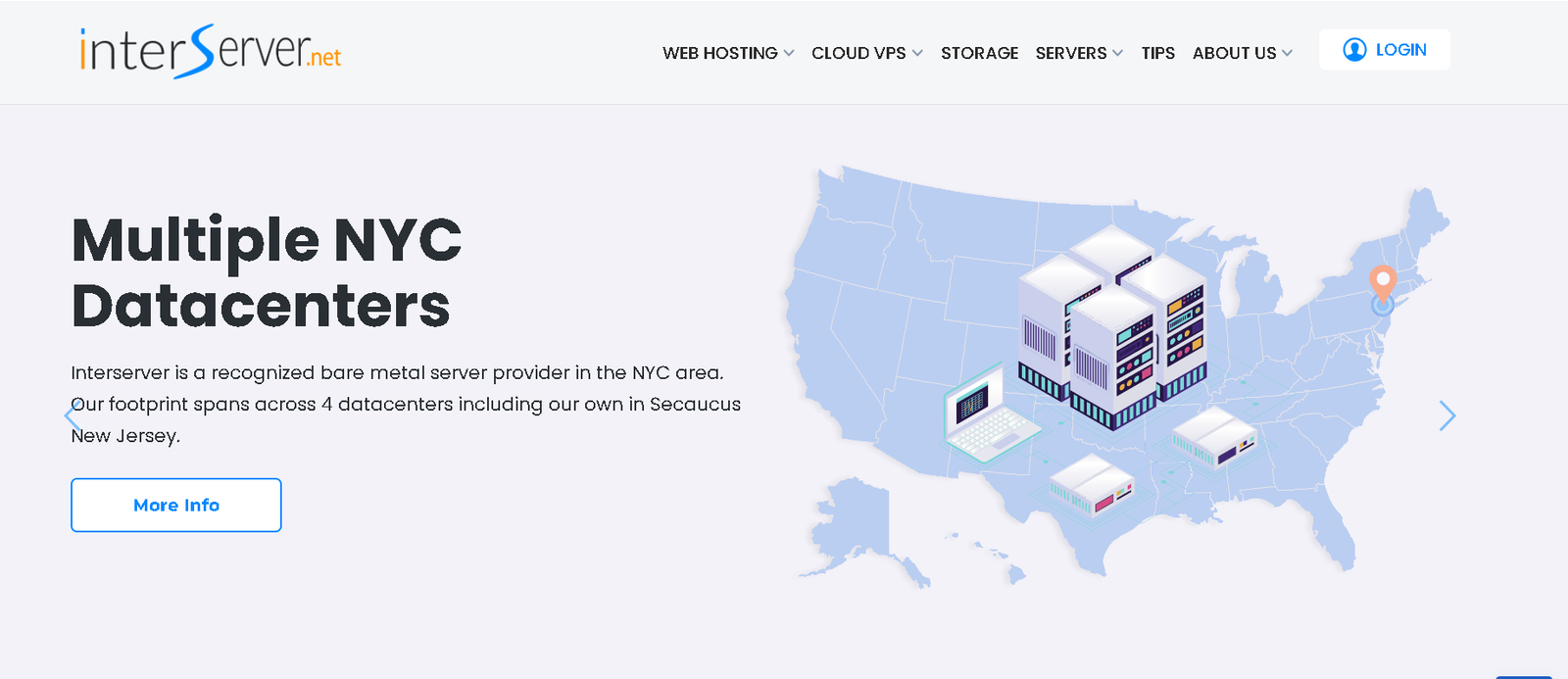
InterServer’s appeal lies in its clear offering of unlimited resources at low rates. While it fulfills this promise, it doesn’t offer many exceptional features beyond that. Additionally, with data centers only in the US, it may not be the best choice for an international site.
However, if you’re okay with these limitations, InterServer offers excellent performance and full flexibility at competitive prices.
In this InterServer review, I’ll take an in-depth look at this lesser-known web hosting provider. I’ll be examining its plans and pricing, ease of use, performance, security, and customer support. Every aspect will be thoroughly covered.
InterServer isn’t your typical hosting company. It’s not a well-known name in the industry, and it’s rarely talked about. It’s more of an underdog—except that when InterServer succeeds at something, no one seems upset. Instead, people are more… surprised.
4.8
Pricing
Web Hosting ₹208 – ₹5807
WordPress Hosting ₹498 – ₹7969
VPS Hosting ₹498 – ₹7471
Dedicated Server ₹5562 – ₹43996
Reseller Hosting ₹1656 – ₹5807
Server locations
Secaucus ✓
Los Angeles ✓
New York City ✓
Ranked 5 from 3858 Web Hosting
Performance: |4.9| 
InterServer delivers solid performance with reliable uptime and fast loading speeds, thanks to its use of SSD caching servers and optimized technology. However, its performance can vary slightly based on server load. While it’s not the fastest in the market, it offers consistent and dependable service, making it a strong option for those seeking value without compromising on quality.
Uptime: |4.9|
InterServer boasts impressive uptime, consistently delivering a 99.9% uptime guarantee. This reliability ensures that your website remains accessible with minimal downtime. While occasional maintenance or server load may cause brief disruptions, these are rare. Overall, InterServer’s uptime performance is dependable, making it a trustworthy choice for those prioritizing website availability and stability.
Customer Service: |4.8|
InterServer offers responsive customer service, available 24/7 through live chat, phone, and email. Their support team is knowledgeable and helpful, resolving issues efficiently. However, response times can vary, with live chat generally being quicker. While not the most polished, their customer service is reliable and accessible, making it a solid option for users needing consistent support.
Pricing: |4.7|
InterServer offers competitive pricing with a straightforward approach—there are no hidden fees or sudden price hikes upon renewal. Their plans start at affordable rates, and you get unlimited resources without long-term contracts. The pricing is consistent and transparent, making InterServer an appealing option for budget-conscious users who want reliable hosting without worrying about unexpected costs.
INTERSERVER
| ⭐ Rating: | 4.8 ★ ★ ★ ★ ★ |
|---|---|
| 💵 Price: | From $2.50/month | 📑 Uptime guarantee: | 99.99% |
| ⚙️ Hosting types: | Shared, VPS, reseller, and dedicated hosting | 🌎 Server locations: | The US |
| 👨💻 24/7 live support: | Yes | 🔥 Coupons: | InterServer Coupons 65% off! |
Overview
A Return-to-Basics Host Who Certainly Does

Even though it has been in business for a while, InterServer doesn’t advertise as much as more well-known brands like Bluehost or Hostinger. Without flashy marketing or even a modern-looking website, InterServer has remained one of the most popular hosting providers. It boasts a large user base, high rankings in third-party reviews, and frequent recommendations on user forums.
I wanted to understand why. Does InterServer simply offer lower prices than its competitors, or does it have other advantages? To find out, I put InterServer through rigorous tests and conducted thorough research over a month. I examined everything from features and performance to customer support.
The bottom line: InterServer offers excellent value with strong core features, good performance, and affordable pricing. However, its lack of standout extras, slightly dated interface, and inconsistent user experience might lead you to consider other hosts that are a bit more expensive but offer a more modern experience.
Is InterServer the right choice for your website? Keep reading to find out.
FEATURES |4.8|
Solid Basic Features with Few Surprises
Some hosting providers focus on flashy features like AI tools, proprietary control panels, and SEO assistance, often at the expense of core hosting essentials. There’s little value in a host that offers gimmicks like “foot massages” if it can’t deliver good loading speeds, consistent uptime, or adequate storage.
InterServer doesn’t address your foot aches, but it does provide high-quality basic tools to ensure reliable speed, uptime, and security.
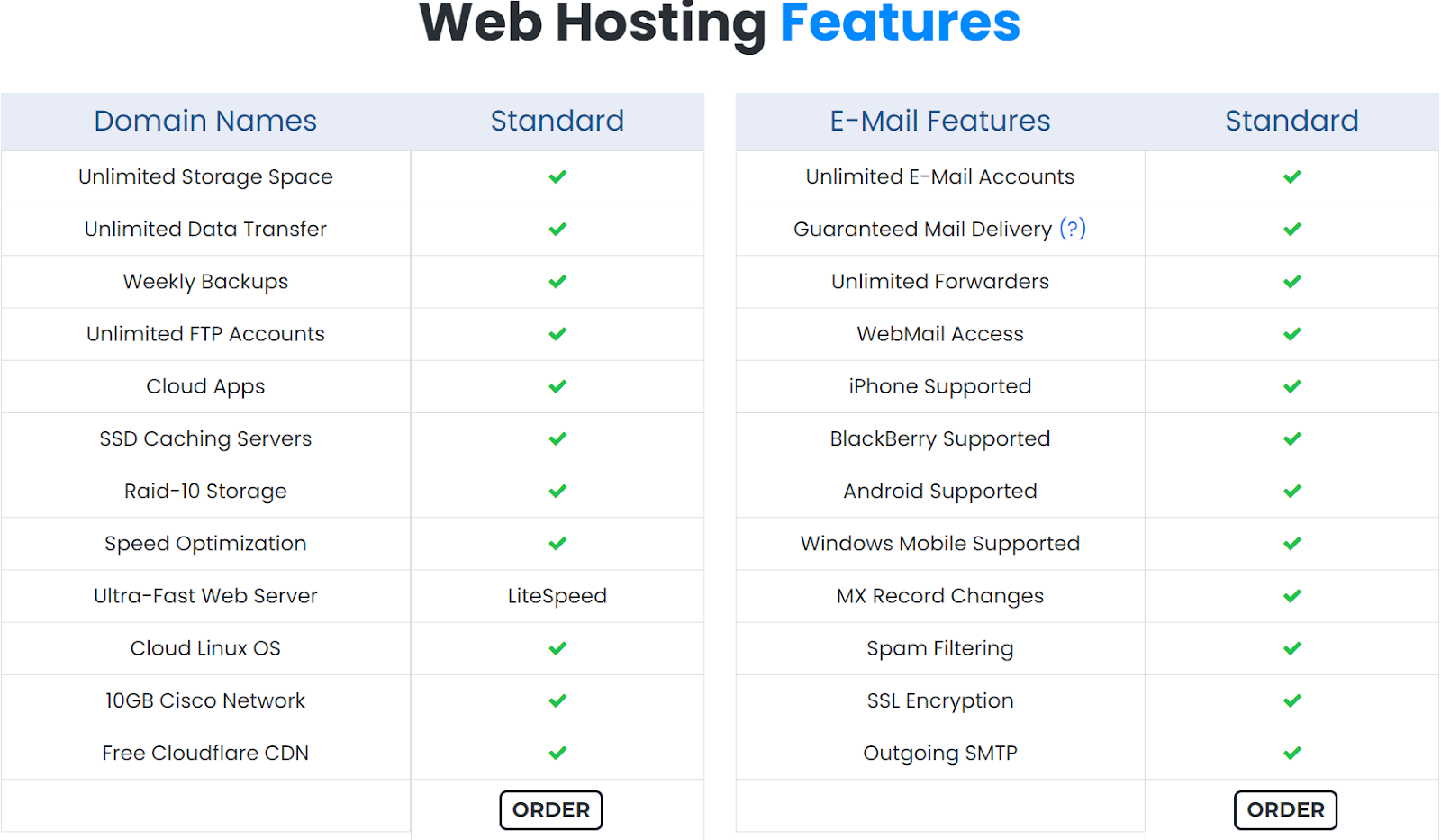
InterServer’s approach is straightforward: it focuses on essential features, offering unlimited storage space and bandwidth for as many sites as your plan supports, even on entry-level plans. However, it lacks standout features like Hostinger’s user-friendly hPanel or Kinsta’s specialized WordPress optimization tools.

Unlimited Resources on Entry-Level Plans
InterServer provides a range of shared hosting plans at competitive prices. Its Standard Web Hosting plans run on Linux and include all the basics of shared hosting. For enhanced performance, you can opt for a Boost plan, which adds extra resources to the shared hosting plans. Additionally, InterServer stands out for offering shared Windows hosting with its ASP.NET plans.
What truly distinguishes InterServer is its provision of unlimited resources—such as unlimited websites, SSD storage, bandwidth, and email accounts—even with its most basic plan. In practice, the number of sites you can run will be limited by the vCPUs and RAM of the plan. Nevertheless, InterServer remains one of the few providers in its class to offer unlimited resources at such affordable rates.
Blazing-Fast Speeds with LiteSpeed Servers
While many shared hosting providers use Apache servers, InterServer sets itself apart by offering LiteSpeed servers from the start. Apache is versatile and compatible with various operating systems, but it’s not the most optimized for websites running content management systems (CMSs) like WordPress.
For top-tier performance on a WordPress site, LiteSpeed servers are the best choice. They handle dynamic content more efficiently, and WordPress even has a dedicated plugin—LiteSpeed Cache for WordPress Plugin (LSCWP)—designed to optimize LiteSpeed caching, significantly improving loading times for WordPress sites.
While it’s possible to install OpenLiteSpeed (the free version) or LiteSpeed with other hosting providers, the process can be complex and often comes with additional costs. InterServer stands out as one of the few hosts to offer LiteSpeed servers pre-installed with its standard hosting plans.
Keep Your Site Secure with Inter-Insurance
Security is often overlooked by some hosting providers, especially in shared hosting plans, which can be more susceptible to DDoS attacks and data breaches. InterServer, however, prioritizes security with its Inter-Insurance feature, ensuring your site stays protected from common threats.
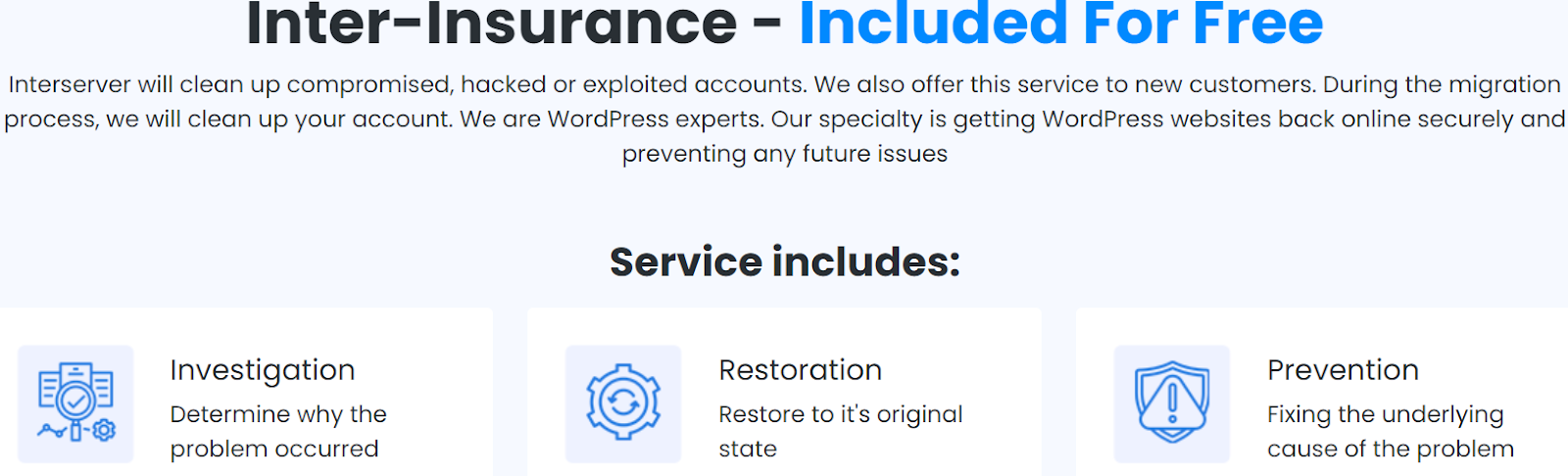
InterServer’s branded “Inter-Insurance” means they offer full account restoration for compromised accounts and actively work to prevent security breaches, ensuring your hosting stays secure.
In addition to Inter-Insurance, InterServer provides InterShield Security, which monitors data across all servers. After any attack, custom security rules are implemented to prevent the same attack from happening again across their network.
Hosting Options for Different Needs
While this review primarily focuses on InterServer’s shared hosting plans, it’s worth noting that InterServer offers a wide range of other hosting options. For those seeking more power, InterServer provides virtual private servers (VPS) and dedicated server hosting at competitive prices.
VPS is a significant upgrade from standard shared hosting, offering more power but requiring some technical know-how, especially since InterServer’s VPS plans are not managed. For even greater control and resources, InterServer offers a variety of dedicated server configurations, including GPU-based dedicated servers.
Popular web Hosting Provider




Quick Overview of InterServer Features
| Free Domain Name | ❌ |
| Free SSL | ✔ |
| Money-back guarantee | 30 Days |
| Uptime guarantee | Yes |
| Data centers | 6 in the US |
EASY TO USE |4.9|
Not a Terrible User Experience, but It Can Be Frustrating at Times
InterServer’s main drawback is its outdated user experience. This isn’t a technology issue—their hardware is top-notch, even on the most affordable VPS packages, which include powerful 24-core processors and DDR4 RAM, with dedicated GPU servers running on RTX 4080s. In short, their hardware is modern and high-performance.
However, the user interface (UI) is where InterServer falls short. It feels dated, with a grey, uninspiring design that looks like it belongs on an old Windows XP machine. The interface is also somewhat fragmented, and managing your hosting might take longer than with other providers, who streamline these processes into just a few clicks.
While it’s not overly complicated, the setup process can be frustrating and less intuitive than it should be.
Creating a New Account with InterServer
To create a new account with InterServer, start by visiting InterServer.net, choose your hosting plan, and click on the enthusiastic “Buy Now!” button. Next, you’ll need to enter your desired domain name, followed by standard information like your name, address, and phone number.
You’ll then have the option to add domain registration and Whois privacy to your package, select your billing interval (every 1, 6, 12, or 24 months), apply any coupons, and click “continue.” After your payment is processed, InterServer will send a confirmation email. Once you activate your account through the email, you’ll gain access to the InterServer control panel.

Once in the control panel, you can access your hosting plan by selecting the “web hosting” panel and clicking the gear icon next to your hostname. Unlike some other hosts, InterServer doesn’t offer a proprietary hosting management panel or include cPanel.
Instead, you’ll manage your hosting through DirectAdmin, which doesn’t come with additional costs. Professionally, DirectAdmin is a functional hosting management tool, but personally, it feels a bit cheap and unintuitive.
DirectAdmin can handle hosting management tasks just as well as other panels, but it can be more difficult to navigate, especially for beginners.
Connecting a Domain and Installing WordPress
Typically, connecting a domain and installing WordPress is a straightforward process that takes less than 10 minutes with most hosts. However, my experience with InterServer was different—and not in a positive way.
Even if you purchase your domain through InterServer, it won’t automatically point your domain to your hosting. You’ll need to do this manually by going into the “DNS management” tab in your InterServer control panel and updating your DNS records under the “Hosting” tab. After that, you must replicate these changes in DirectAdmin. InterServer warns that “DNS changes might take up to 24 hours to take effect.”
In my case, after four days, my domain still wasn’t connected to my hosting. I reached out to customer support and filed a ticket, after which a support representative informed me that my domain was now connected. Despite this, I couldn’t identify any changes in the domain records, and I’m still unsure what the issue was.
Weekly Automatic Backups
Managing backups for your website can often slip your mind, especially if you’re handling everything on your own. Despite this, regular backups are essential—you may never need them, but they can be a lifesaver if something goes wrong.
Fortunately, InterServer provides free weekly backups with all its plans, ensuring your site’s data is periodically saved. Additionally, you have the option to create manual backups whenever you need to, giving you extra peace of mind that your site’s data is secure.
Comprehensive Email Features
Lorem ipsum dInterServer doesn’t just offer unlimited email accounts with any plan; it also provides a wide range of advanced email management tools to tailor your email experience to your needs. You can access your email from any device, enjoy guaranteed email delivery, and benefit from powerful spam filtering tools.olor sit amet, consectetur adipiscing elit. Ut elit tellus, luctus nec ullamcorper mattis, pulvinar dapibus leo.
PERFORMANCE |4.9|
Impressive Loading Speeds for U.S. Audiences
InterServer aims to provide a straightforward offering: shared hosting with unlimited resources and top-notch performance at affordable rates. While I had some reservations about the sign-up process, the DirectAdmin control panel, and the lack of standout features, I was curious to see if InterServer’s performance would compensate for these drawbacks. Did it?
In short, yes. InterServer delivers excellent performance across North America and decent speeds worldwide, even with its data centers located solely in the U.S.
To evaluate InterServer’s performance, we subjected it to our standard web hosting testing process. We take great pride in the thoroughness of our tests—details of which you can find here.
Here’s a brief summary: We created a fully functional landing page complete with HD images, scrolling effects, and all the elements you’d expect from a modern 2024 landing page. We then hosted it on InterServer’s Standard Web Hosting plan and monitored it to gain a comprehensive view of its performance, uptime, and global reach. You can read on for an in-depth analysis or skip ahead to my experience with support.
The even shorter version: InterServer delivered flawless uptime, a typical loading time of around 1.2 seconds, and surprisingly good global loading speeds considering its limited data centers. Fully loaded times occasionally exceeded 2 seconds, but at this price point, it’s difficult to find comparable results from other providers’ entry-level plans.
GTMetrix
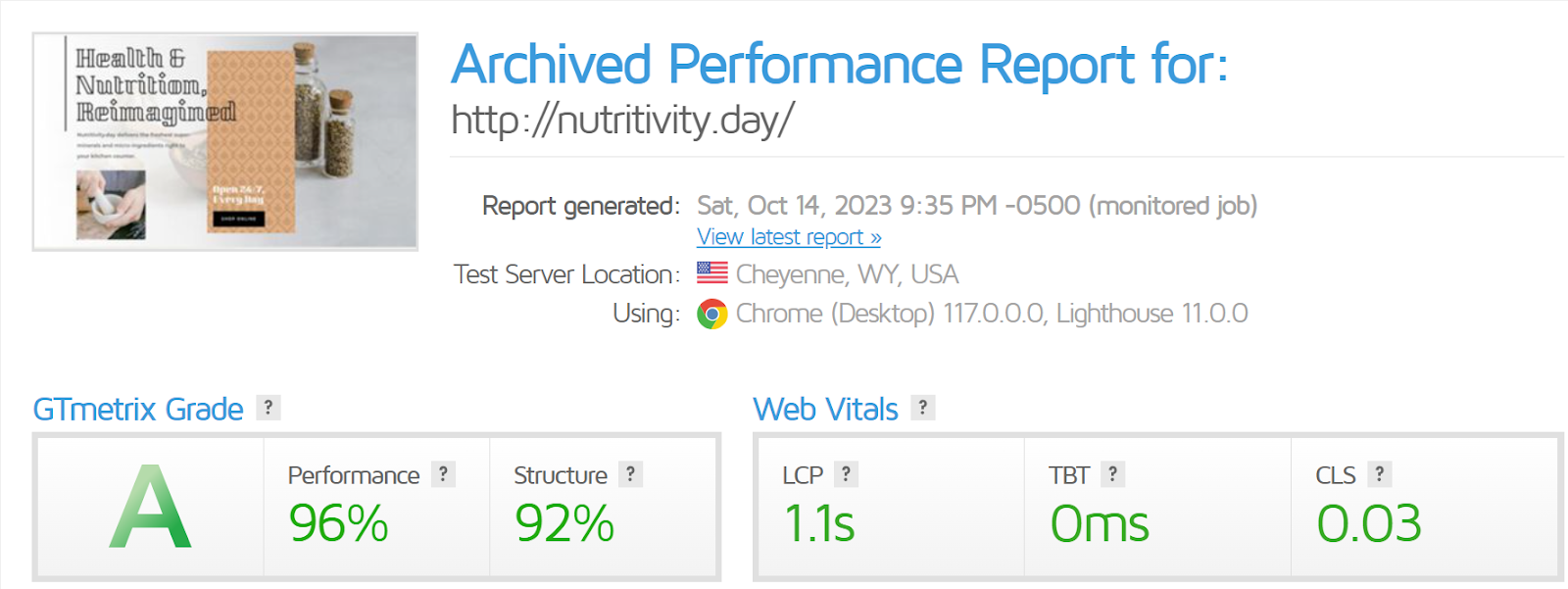
Lorem ipsum dolor sit amet, consectetur adipiscing elit. Ut elit tellTo assess local performance, we used GTMetrix to test InterServer’s entry-level plan. I configured a Wyoming server to record the loading speed every hour.
Over two weeks of testing, my site consistently loaded in about 1.2 seconds, with only one notable spike in loading time.us, luctus nec ullamcorper mattis, pulvinar dapibus leo.
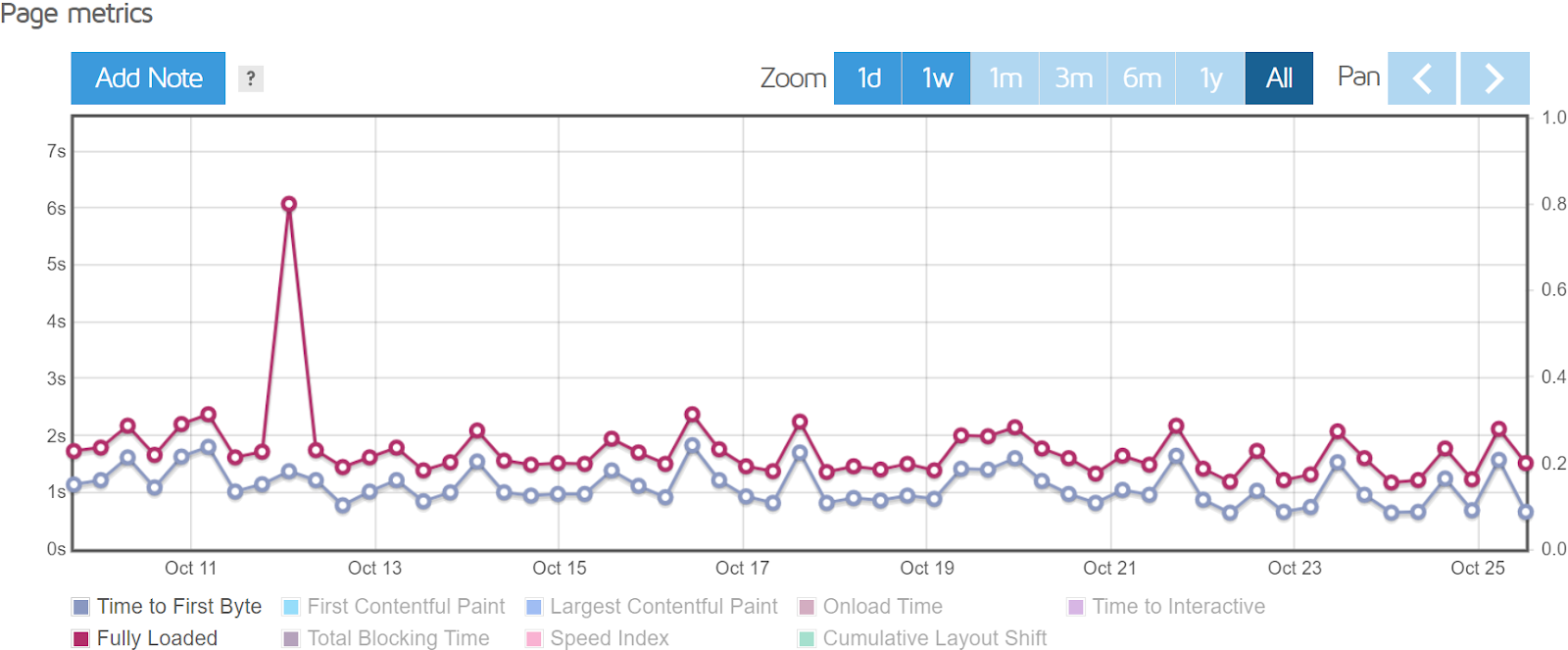
Overall, the outcomes ranged from excellent to passable. One unusual surge in loading speed is not a cause for concern; however, loading times have occasionally exceeded two seconds, which is concerning but not fatal.
Sucuri Load Time Tester
To evaluate the global reach of each site, we rely on the Sucuri Load Time Tester tool. One drawback of this tool is that some hosts block it in certain regions, which can result in a “could not test website from this server” error. This doesn’t necessarily indicate a failure, but rather an inability to obtain results.
Given that InterServer’s data centers are exclusively in the U.S. and I wasn’t using a content delivery network (CDN) for my site, I anticipated poor results from the Sucuri Load Time Tester. We always test default vendor plans to simulate the experience of a beginner user who hasn’t adjusted any settings.

However, the results were unexpectedly positive. InterServer not only delivered strong performance in its primary area, but my site also achieved loading times of under two seconds even in locations as distant as Western Europe.
That said, if you’re planning to host a site with a global audience using InterServer, implementing a CDN is essential. Fortunately, this isn’t a major hurdle, as InterServer provides easy integration with CloudFlare’s CDN.
SUPPORT |4.6|
My Support Experience Was Very Disappointing
As I mentioned earlier, I had to interact with support multiple times just to set up my WordPress website. I ended up using the ticket system on several other occasions as well. Initially, I wanted to find out where my site’s data center was located, as this information wasn’t provided during sign-up or accessible through DirectAdmin. I received a response that was clear and prompt, though it lacked detail.

The real issues started when I requested more substantial assistance from support. As part of a separate review, I wanted to test InterServer’s VPS capabilities. After the initial testing period, I began the process of switching to a VPS server. When I asked support for help with upgrading my plan and migrating my website, they replied with a “yes,” but only if I purchased a higher-tier plan.
Security – Is InterServer Secure?
When it comes to security, InterServer covers all the bases. Each plan includes a free SSL certificate, weekly backups, and easy Cloudflare integration. Additionally, you get free access to InterShield and Inter-Insurance.
Like any reputable hosting provider, InterServer offers a comprehensive suite of standard security features. What stood out to me is how InterServer outperforms more popular and expensive providers by going above and beyond. Here’s a rundown of the standard security features you’ll get with an InterServer plan:
A free Let’s Encrypt SSL Certificate: While not all hosting providers offer this for free, InterServer does, which is worth appreciating—even if most do.
Weekly backups: According to a customer support agent, these backups are stored on a remote server for enhanced security.
Cloudflare integration: This includes protection against DDoS attacks.
This security suite sounds impressive, though it operates entirely in the backend, so you’ll have to trust that it’s working as promised, without any input required on your part.
Another free package you receive is Inter-Insurance. Although details are sparse, this service is available to those whose websites get infected or hacked. InterServer promises to investigate the issue, restore your site, and work to prevent future occurrences—all at no additional cost.
PRICING |4.9|
InterServer Is Affordable (Even After Renewal)
Unlike many other web hosts, InterServer’s Standard Web Hosting plan offers consistent pricing regardless of your billing period. Whether you opt for monthly billing or pay for up to two years in advance, the cost remains ₹498 per month for your initial term.
This pricing is not only highly competitive, but InterServer’s post-renewal price increase is also reasonable for what’s included in the package. While the renewal rate is higher than the introductory price, it’s still a great deal when you compare it to what other providers charge for entry-level plans that often come with limitations on the number of sites or the amount of storage.
CLOUDWAYS PRICING |4.7|
Cloudways allows you to choose between monthly or hourly payments, depending on your preference.
While using Cloudways might be more expensive compared to going directly through cloud providers, you’re paying for the Cloudways control panel, security features, and support services. The added value includes WordPress-specific optimizations that help your site load faster and run smoothly.
Cloudways lets you scale your hosting plan up or down as needed, ensuring you only pay for the server resources you actually use. This feature is common among hosting providers, but it’s worth noting. At the end of each month, Cloudways bills you based on the resources consumed during that period.
You can test Cloudways’ services with a free three-day trial. Although three days isn’t a lot of time, it will give you a glimpse of how the service operates. Cloudways doesn’t offer a standard 30-, 60-, or 90-day money-back guarantee, but the pay-as-you-go pricing somewhat eliminates the need for such a guarantee.
The renewal price remains consistent no matter the length of your billing period, making this an ideal option if you prefer not to commit to a plan for two, three, or even four years.
This flexible pricing isn’t limited to the standard shared hosting plan. InterServer’s Boost plans, ASP.NET plans, and VPS plans all follow the same billing structure. If you’re looking for a host that offers no-commitment monthly payments, InterServer is definitely worth considering.
InterServer Web Hosting
| Plan Name | Storage | Bandwidth | Free SSL | Number of Sites | Price | Link |
|---|---|---|---|---|---|---|
| STANDARD WEB HOSTING | Unlimited SSD | Unlimited | Unlimited | ₹208 | More details | |
| Windows ASP.NET | Unlimited | Unlimited | 25 | ₹664 | More details | |
| BOOST 2 WEB HOSTING | Unlimited SSD | Unlimited | Unlimited | ₹826 | More details | |
| BOOST 4 WEB HOSTING | Unlimited SSD | Unlimited | Unlimited | ₹1656 | More details | |
| BOOST X WEB HOSTING | Unlimited SSD | Unlimited | Unlimited | ₹5807 | More details |
InterServer WordPress Hosting
| Plan Name | Storage | Bandwidth | Price | Link |
|---|---|---|---|---|
| WordPress 1 | 30 GB SSD | 2 TB | ₹498 | More details |
| WordPress 2 | 60 GB | 4 TB | ₹996 | More details |
| WordPress 3 | 90 GB | 6 TB | ₹1494 | More details |
| WordPress 4 | 120 GB SSD | 8 TB | ₹1992 | More details |
| WordPress 5 | 150 GB | 10 TB | ₹2490 | More details |
| WordPress 6 | 180 GB | 12 TB | ₹2988 | More details |
| WordPress 7 | 210 GB SSD | 14 TB | ₹3487 | More details |
| WordPress 8 | 240 GB | 16 TB | ₹3985 | More details |
| WordPress 9 | 270 GB | 18 TB | ₹4483 | More details |
| WordPress 10 | 300 GB SSD | 20 TB | ₹4981 | More details |
| WordPress 11 | 330 GB | 22 TB | ₹5479 | More details |
| WordPress 12 | 360 GB | 24 TB | ₹5977 | More details |
| WordPress 13 | 390 GB SSD | 26 TB | ₹6475 | More details |
| WordPress 14 | 420 GB | 28 TB | ₹6973 | More details |
| WordPress 15 | 450 GB | 30 TB | ₹7471 | More details |
| WordPress 16 | 480 GB | 32 TB | ₹7969 | More details |
InterServer VPS Hosting
| Plan Name | Storage | Bandwidth | CPU | RAM | Price | Link |
|---|---|---|---|---|---|---|
| VPS1 - Linux | 30 GB SSD | 1 TB | 1 CORE | 2 GB | ₹498 | More details |
| VPS2 - Linux | 60 GB SSD | 2 TB | 2 CORE | 4 GB | ₹996 | More details |
| VPS3 - Linux | 90 GB | 3 TB | 3 CORES | 6 GB | ₹1494 | More details |
| VPS4 - Linux | 120 GB | 4 TB | 4 CORES | 8 GB | ₹1992 | More details |
| VPS5 - Linux | 150 GB | 5 TB | 5 CORE | 10 GB | ₹2490 | More details |
| VPS6 - Linux | 180 GB | 6 TB | 6 CORE | 12 GB | ₹2988 | More details |
| VPS7 - Linux | 210 GB | 7 TB | 7 CORES | 14 GB | ₹3487 | More details |
| VPS8 - Linux | 240 GB | 8 TB | 8 CORES | 16 GB | ₹3985 | More details |
| VPS9 - Linux | 270 GB | 9 TB | 9 CORE | 18 GB | ₹4483 | More details |
| VPS1 - Windows | 30 GB | 2 TB | 1 CORE | 2 GB | ₹830 | More details |
| VPS2 - Windows | 60 GB | 4 TB | 2 CORES | 4 GB | ₹1660 | More details |
| VPS3 - Windows | 90 GB SSD | 6 TB | 3 CORES | 6 GB | ₹2490 | More details |
InterServer Alternative


Frequently Asked Question.
InterServer provides a range of hosting options, including Standard Web Hosting, VPS (Virtual Private Server) Hosting, Dedicated Servers, and specialized plans like ASP.NET Hosting and Boost Plans.
Yes, InterServer offers a 30-day money-back guarantee on their shared hosting plans, allowing you to try the service risk-free.
Yes, InterServer provides free website migration services. Their support team will assist in transferring your website from your current host to InterServer.
InterShield is InterServer’s native security suite. It includes automatic virus scanning, a machine-learning firewall, web attack blocking, and an in-house malware database to keep your site secure.
Yes, InterServer’s prices increase after the initial term. However, the renewal rates are consistent regardless of the length of the billing period and are still competitively priced compared to other providers.
Yes, InterServer includes a free Let’s Encrypt SSL certificate with all of its hosting plans, ensuring that your site is secure and trusted by visitors.
InterServer offers 24/7 customer support through live chat, phone, and a ticketing system. They also provide extensive documentation and tutorials to help you manage your hosting account.
InterServer boasts a strong uptime record, typically providing near-perfect uptime. They offer an uptime guarantee as part of their service commitment.
Yes, InterServer allows month-to-month payments on all its hosting plans, giving you flexibility without long-term commitments
- InterServer performs weekly backups for all hosting plans, storing them on a remote server for added security. Additionally, you can create manual backups at any time.